Computer System
Comprehensive study notes, definitions, diagrams, and board examination questions prepared for Class 11 students.
Welcome, NEB Class 11 Computer Science students! This chapter, "Computer System," is fundamental to your understanding of how computers work and is a crucial unit for your upcoming National Examinations Board (NEB) theory exam. The Curriculum Development Centre (CDC) has designed this syllabus to equip you with essential knowledge about computer hardware, its evolution, and its core components. Mastering these concepts will not only help you score well in the board exams but also build a strong foundation for your future studies in Information and Communication Technology (ICT).
In your NEB Class 11 Computer Science theory exam, this chapter is highly relevant. You can expect Multiple Choice Questions (MCQs), Short Answer Questions (SAQs), and Long Answer Questions (LAQs) from these topics. Pay close attention to definitions, differences between components, and the functions of various parts of a computer system, as these are frequently tested. Let's dive in!
Introduction of Computer
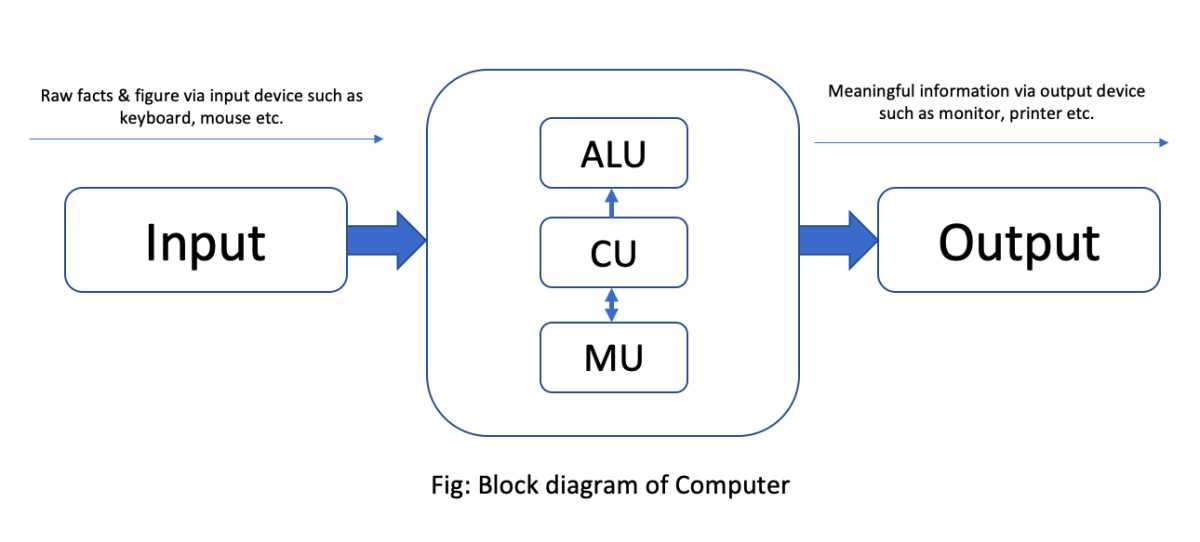
A computer is an electronic device that accepts raw data and instructions from users, processes it according to a given set of instructions, stores the processed data, and produces meaningful information as output. The word "Computer" is derived from the Latin word "Computare," which means 'to calculate'. Modern computers are versatile machines capable of performing complex mathematical calculations accurately and quickly, as well as handling tasks like creating documents, videos, games, and presentations.
Key Characteristics of a Computer:
- Speed: Computers can perform calculations and process information at incredibly high speeds, often measured in millions of instructions per second (MIPS).
- Accuracy: Computers are highly accurate and perform tasks without errors, provided the input data and instructions are correct.
- Diligence: Unlike humans, computers do not suffer from boredom, fatigue, or lack of concentration. They can perform repetitive tasks with the same speed and accuracy.
- Versatility: A computer can perform a wide range of tasks, from complex scientific calculations to simple word processing, making it a truly multipurpose device.
- Storage Capacity: Computers have the ability to store vast amounts of data and information, both temporarily (primary memory) and permanently (secondary memory).
- Reliability: Computers are generally reliable and consistent in their performance.
Evolution of Computer Technology (Generations)
The evolution of computers is categorized into generations, each marked by significant technological advancements that led to smaller, faster, cheaper, and more efficient machines.
1. First Generation (1940s-1950s): Vacuum Tubes
- Technology: Used vacuum tubes for circuitry and magnetic drums for memory.
- Characteristics: Very large in size, consumed enormous amounts of electricity, generated a lot of heat, and were expensive. Programming was done in machine language.
- Examples: ENIAC, UNIVAC.
2. Second Generation (1950s-1960s): Transistors
- Technology: Replaced vacuum tubes with transistors.
- Characteristics: Smaller, faster, more reliable, and consumed less power than first-generation computers. High-level programming languages like FORTRAN and COBOL were introduced.
- Examples: IBM 7000 series, CDC 1604.
3. Third Generation (1960s-1970s): Integrated Circuits (ICs)
- Technology: Used Integrated Circuits (ICs), which combined multiple transistors on a single silicon chip.
- Characteristics: Further reduction in size and cost, increased speed and efficiency. Operating systems were introduced, allowing computers to run multiple applications simultaneously.
- Examples: IBM System/360, PDP-8.
4. Fourth Generation (1970s-Present): Microprocessors
- Technology: Utilized Very Large Scale Integration (VLSI) technology, leading to the development of microprocessors. A microprocessor contains all the components of a computer's central processing unit (CPU) on a single chip.
- Characteristics: Personal computers (PCs) became widely available. Graphical User Interfaces (GUIs), mouse, and handheld devices emerged. Networking and the internet began to develop.
- Examples: Apple Macintosh, IBM PC.
5. Fifth Generation (Present and Beyond): Artificial Intelligence (AI)
- Technology: Based on Artificial Intelligence (AI) and parallel processing.
- Characteristics: Aim to develop computers that can understand natural language, learn, reason, and make decisions. Focus on areas like robotics, expert systems, and natural language processing.
- Examples: AI-powered systems, quantum computing, neural networks.
Measurement Unit of Processing Speed and Storage Unit
Understanding how computer speed and storage are measured is essential for evaluating performance.
Processing Speed:
The processing speed of a computer, particularly its CPU, is measured in cycles per second, known as Hertz (Hz).
- Hertz (Hz): One cycle per second.
- Kilohertz (KHz): 1,000 Hz
- Megahertz (MHz): 1,000 KHz or 1,000,000 Hz
- Gigahertz (GHz): 1,000 MHz or 1,000,000,000 Hz (Most modern CPUs operate in the GHz range).
A higher clock speed generally indicates faster processing, though other factors like core count and architecture also play a significant role.
Storage Unit:
Computer storage is measured in bits and bytes, which represent binary digits (0s and 1s).
- Bit (b): The smallest unit of data, a binary digit (0 or 1).
- Nibble: 4 bits.
- Byte (B): 8 bits. This is the fundamental unit for storing a single character (e.g., 'A', '1', '$').
- Kilobyte (KB): 1,024 bytes.
- Megabyte (MB): 1,024 KB.
- Gigabyte (GB): 1,024 MB.
- Terabyte (TB): 1,024 GB.
- Petabyte (PB): 1,024 TB.
These units help quantify the capacity of memory and storage devices like RAM, hard drives, and pen drives.
Types of Computers (Super, Mainframe, Mini, Microcomputers)
Computers can be classified based on their size, speed, cost, and capabilities.
1. Supercomputers:
- Characteristics: The fastest, most powerful, and most expensive computers. They can perform trillions of calculations per second.
- Applications: Used for highly complex scientific and engineering problems, weather forecasting, climate research, nuclear research, and advanced simulations.
- Example: Summit (IBM), Fugaku (Fujitsu).
2. Mainframe Computers:
- Characteristics: Large, powerful, and expensive computers capable of supporting hundreds or thousands of users simultaneously. They have high processing power and large storage capacity.
- Applications: Used by large organizations for critical applications like bulk data processing, enterprise resource planning (ERP), transaction processing (e.g., banking, airlines), and scientific research.
- Example: IBM zSeries.
3. Minicomputers (Midrange Computers):
- Characteristics: Smaller and less powerful than mainframes but more powerful than microcomputers. They can support dozens to hundreds of users.
- Applications: Used by small to medium-sized organizations for specific tasks like process control, data management, and scientific instrumentation.
- Example: DEC PDP series, IBM AS/400.
4. Microcomputers (Personal Computers - PCs):
- Characteristics: Smallest, least expensive, and most common type of computer. Designed for individual users.
- Applications: Widely used in homes, schools, offices, and small businesses for tasks like word processing, internet browsing, gaming, and multimedia.
- Types: Desktops, Laptops, Tablets, Smartphones, Workstations.
- Example: Desktop PCs, Apple MacBooks, smartphones. In Nepal, microcomputers are ubiquitous in educational institutions, government offices, and personal use.
Mobile Computing and its Applications
Mobile computing refers to the use of portable computing devices and wireless networks to access information and applications from virtually anywhere. It has revolutionized how we interact with technology and the world.
Key Concepts:
- Portability: Devices are small and lightweight, allowing users to carry them easily.
- Connectivity: Relies on wireless networks (Wi-Fi, cellular data like 4G/5G) for internet access.
- Interactivity: Often features touchscreens, voice commands, and sensors for user interaction.
Applications of Mobile Computing:
- Communication: Instant messaging, video calls, email, social media (e.g., Viber, WhatsApp, Facebook widely used in Nepal).
- Education: E-learning platforms, educational apps, online research, accessing digital notes like these.
- Business: Mobile banking (e.g., eSewa, Khalti in Nepal), online shopping, mobile payments, remote work, sales force automation.
- Navigation: GPS services, mapping applications (e.g., Google Maps).
- Entertainment: Mobile gaming, streaming music and videos, e-books.
- Healthcare: Fitness trackers, health monitoring apps, telemedicine.
- Emergency Services: Quick access to emergency contacts, location sharing.
Concept of Computer Architecture and Organization
Computer Architecture: This refers to the conceptual design and fundamental operational structure of a computer system. It describes what the computer does and what it needs to do. It includes the instruction set architecture, memory organization, and input/output mechanisms. It's like the blueprint of a building.
Computer Organization: This refers to the physical implementation of the computer architecture. It describes how the computer system is structured and how its components are interconnected to implement the architecture. It deals with the operational units and their interconnections that realize the architectural specifications. It's like the actual construction of the building based on the blueprint.
In essence, architecture focuses on the user's perspective (what is visible to the programmer), while organization focuses on the hardware's perspective (how the components are connected and function).
Components of Computer System (Input unit, Output unit, CPU, Memory unit)
A computer system fundamentally operates on the Input-Process-Output (IPO) cycle. The main components that facilitate this cycle are:
1. Input Unit:
- Function: Accepts data and instructions from the user and converts them into a form that the computer can understand (binary code).
- Examples: Keyboard, Mouse, Scanner, Microphone.
2. Central Processing Unit (CPU):
- Function: Often called the "brain" of the computer, the CPU performs all arithmetic and logical operations, controls the flow of data, and executes instructions.
- Components of CPU:
- Arithmetic Logic Unit (ALU): Performs arithmetic operations (addition, subtraction, multiplication, division) and logical operations (comparisons like greater than, less than, equal to).
- Control Unit (CU): Manages and coordinates all the components of the computer system. It fetches instructions from memory, decodes them, and directs the other units to perform the necessary operations.
- Registers: Small, high-speed storage locations within the CPU used to temporarily hold data and instructions during processing.
3. Memory Unit:
- Function: Stores data and instructions. It is categorized into primary and secondary memory.
- Primary Memory (Main Memory): Directly accessible by the CPU. It holds data and instructions that the CPU is currently working on. (e.g., RAM, ROM).
- Secondary Memory (Auxiliary Memory): Provides long-term storage for data and programs that are not currently in use. (e.g., Hard Disk, SSD, Pen Drive).
4. Output Unit:
- Function: Converts the processed information (results) from the computer's binary form into a human-readable format.
- Examples: Monitor, Printer, Speaker.
Microprocessor (Basic Concepts, Clock Speed, Word Length)
A microprocessor is a computer processor that incorporates the functions of a central processing unit (CPU) on a single integrated circuit (IC), or at most a few integrated circuits. It is the core component of a computer that performs most of the processing.
- Basic Concepts: It contains the ALU, CU, and registers. It fetches instructions, decodes them, executes them, and stores the results.
- Clock Speed: Measured in Hertz (Hz), it indicates how many instruction cycles the microprocessor can execute per second. A 2 GHz processor can execute 2 billion cycles per second. Higher clock speed generally means faster processing.
- Word Length: Refers to the number of bits that the CPU can process at one time. Common word lengths are 32-bit and 64-bit. A 64-bit processor can process more data simultaneously than a 32-bit processor, leading to faster performance and the ability to access more memory.
Primary Memory (RAM, ROM, types)
Primary memory, also known as main memory, is directly accessible by the CPU and is crucial for the computer's operation.
1. RAM (Random Access Memory):
- Nature: Volatile memory, meaning it loses its contents when the power is turned off.
- Function: Used to temporarily store data and programs that the CPU is currently using. Data can be read from and written to RAM quickly.
- Types:
- SRAM (Static RAM): Faster and more expensive than DRAM. Used for cache memory. It retains data as long as power is supplied and does not need to be refreshed.
- DRAM (Dynamic RAM): Slower and less expensive than SRAM. Used for the main system memory. It needs to be constantly refreshed to retain data.
2. ROM (Read Only Memory):
- Nature: Non-volatile memory, meaning its contents are retained even when the power is turned off.
- Function: Stores permanent instructions (firmware) required to start up the computer (BIOS - Basic Input/Output System). Data can typically only be read from ROM, not written to it by the user.
- Types:
- PROM (Programmable ROM): Can be programmed once by the user.
- EPROM (Erasable Programmable ROM): Can be erased by exposure to ultraviolet light and then reprogrammed.
- EEPROM (Electrically Erasable Programmable ROM): Can be erased and reprogrammed electrically, without removing it from the circuit.
Secondary Memory (Magnetic Disk, Flash Memory, CD, DVD, SSD, Pen Drive)
Secondary memory, also known as auxiliary storage, provides long-term, non-volatile storage for data and programs. It is not directly accessible by the CPU and is slower than primary memory but offers much larger storage capacity at a lower cost.
1. Magnetic Disk (Hard Disk Drive - HDD):
- Description: Uses rapidly rotating platters coated with magnetic material to store data. Data is read and written by magnetic heads.
- Characteristics: High storage capacity (terabytes), relatively inexpensive per gigabyte, but slower and more susceptible to physical damage than SSDs.
2. Flash Memory:
- Description: A non-volatile computer memory that can be electrically erased and reprogrammed.
- Characteristics: Durable, fast, and consumes less power. Used in various devices.
3. CD (Compact Disc):
- Description: An optical storage medium. Data is stored and read using a laser.
- Characteristics: Typically stores up to 700 MB of data. Used for music, software distribution, and data backup.
4. DVD (Digital Versatile Disc):
- Description: An optical storage medium similar to a CD but with higher storage capacity.
- Characteristics: Stores 4.7 GB (single-layer) to 8.5 GB (dual-layer) of data. Used for movies, high-capacity software, and data backup.
5. SSD (Solid State Drive):
- Description: Uses flash memory to store data, similar to a large USB flash drive.
- Characteristics: Much faster than HDDs (due to no moving parts), more durable, consumes less power, but generally more expensive per gigabyte. Increasingly common in modern laptops and high-performance desktops.
6. Pen Drive (USB Flash Drive):
- Description: A portable flash memory data storage device integrated with a USB interface.
- Characteristics: Small, lightweight, durable, and convenient for transferring data between computers. Capacities range from a few gigabytes to several terabytes.
Input Devices (Keyboard, Mouse, Scanner, Light Pen, OMR, Microphone, Webcam)
Input devices allow users to feed data and instructions into a computer system.
- Keyboard: The most common input device for entering text, numbers, and commands.
- Mouse: A pointing device used to control a cursor on the screen, select items, and interact with graphical user interfaces.
- Scanner: Converts physical documents or images into digital format.
- Light Pen: A pointing device used to select objects on a display screen by touching it to the screen.
- OMR (Optical Mark Reader): Reads marks made by pencil or pen on a document, commonly used for processing multiple-choice answer sheets in exams (e.g., entrance exams in Nepal).
- Microphone: Captures sound and converts it into digital audio, used for voice input, recording, and communication.
- Webcam: A digital camera connected to a computer, used for video conferencing, live streaming, and capturing images/videos.
Output Devices (Monitor, Printer, Speaker, Headphones, Projector)
Output devices display or present the processed information from the computer in a human-understandable format.
- Monitor: The primary visual output device, displaying text, images, and video. Types include CRT, LCD, LED, and OLED.
- Printer: Produces hard copies of digital documents on paper. Types include inkjet (for color and photos) and laser (for high-speed text).
- Speaker: Produces audio output, allowing users to hear sounds, music, and voice.
- Headphones: Personal audio output devices worn over or in the ears, providing private listening.
- Projector: Displays computer output onto a large screen or wall, commonly used for presentations in classrooms and meeting rooms.
Hardware Interfaces
Hardware interfaces are the points of connection between a computer and its peripheral devices, or between different internal components. They define how data is exchanged.
- USB (Universal Serial Bus): A standard interface for connecting a wide range of peripheral devices (keyboards, mice, printers, flash drives, smartphones) to a computer. It supports hot-swapping (connecting/disconnecting devices while the computer is on).
- HDMI (High-Definition Multimedia Interface): A digital interface for transmitting high-definition video and audio from a source device (e.g., computer, DVD player) to a display device (e.g., monitor, TV, projector).
- VGA (Video Graphics Array): An older analog interface for connecting a computer to a monitor or projector. It transmits only video signals.
- Ethernet Port (RJ-45): Used for wired network connections, allowing computers to connect to a local area network (LAN) or the internet.
- Audio Jacks (3.5mm): Standard ports for connecting headphones, speakers, and microphones.
- Power Connector: Connects the computer to a power supply.
- SATA (Serial Advanced Technology Attachment): An interface used to connect storage devices like hard disk drives (HDDs) and solid-state drives (SSDs) to the computer's motherboard.
- PCIe (Peripheral Component Interconnect Express): A high-speed expansion bus interface used to connect high-performance components like graphics cards, network cards, and SSDs to the motherboard.
Activities & Practice
Here are some short questions to test your understanding of the "Computer System" chapter. Try to answer them concisely.
- What is the primary difference between RAM and ROM?
- List any three characteristics of a computer.
- Name two input and two output devices commonly used in a Nepali school.
- Briefly explain the concept of a microprocessor.
- Convert 2 GB into KB.
Brief Answers:
- RAM is volatile (loses data when power is off) and used for temporary storage, while ROM is non-volatile (retains data without power) and stores permanent startup instructions.
- Speed, Accuracy, and Versatility.
- Input: Keyboard, Mouse; Output: Monitor, Printer.
- A microprocessor is a CPU on a single integrated circuit, performing arithmetic, logical, and control operations.
- 2 GB = 2 * 1024 MB = 2 * 1024 * 1024 KB = 2,097,152 KB.
Sample Board Exam Questions
These questions are representative of the style and marks you might encounter in your NEB Class 11 Computer Science theory exam.
Section B: Short Answer Questions (5 marks each)
1. Define a computer and explain any four characteristics of a modern computer. (5 marks)
Solution:
A computer is an electronic device that accepts raw data and instructions, processes them according to predefined instructions, stores the data, and produces meaningful information as output.
Four characteristics of a modern computer are:
- Speed: Computers can perform millions of operations per second, enabling rapid data processing and complex calculations.
- Accuracy: Computers are designed to perform tasks with high precision, minimizing errors as long as correct input and instructions are provided.
- Versatility: A single computer can perform a diverse range of tasks, from scientific research and data analysis to entertainment and communication.
- Storage Capacity: Computers can store vast amounts of data and programs on various storage media, making information readily available.
2. Differentiate between primary memory and secondary memory with suitable examples. (5 marks)
Solution:
| Feature | Primary Memory | Secondary Memory |
|---|---|---|
| Nature | Volatile (e.g., RAM) or Non-volatile (e.g., ROM). | Non-volatile (retains data without power). |
| Speed | Faster access speed. | Slower access speed. |
| Capacity | Smaller storage capacity (typically in GBs). | Larger storage capacity (typically in TBs). |
| Cost | More expensive per unit of storage. | Less expensive per unit of storage. |
| CPU Access | Directly accessible by the CPU. | Not directly accessible by the CPU; data must first be loaded into primary memory. |
| Examples | RAM (SRAM, DRAM), ROM (PROM, EPROM). | Hard Disk Drive (HDD), Solid State Drive (SSD), CD, DVD, Pen Drive. |
Section C: Long Answer Questions (8 marks each)
1. Explain the different generations of computer technology, highlighting the key technological advancement and characteristics of each generation. (8 marks)
Solution:
The evolution of computer technology is categorized into five generations, each defined by a major technological breakthrough:
- First Generation (1940s-1950s): Vacuum Tubes
- Technology: Utilized vacuum tubes for core circuitry.
- Characteristics: Enormous in size, generated significant heat, consumed vast amounts of electricity, and were very expensive. Programming was done in low-level machine language.
- Impact: Marked the beginning of electronic computing, but limited by size and inefficiency.
- Second Generation (1950s-1960s): Transistors
- Technology: Replaced bulky vacuum tubes with smaller, more reliable transistors.
- Characteristics: Smaller, faster, more energy-efficient, and less costly than first-generation computers. High-level programming languages like FORTRAN and COBOL were developed.
- Impact: Made computers more practical for commercial use.
- Third Generation (1960s-1970s): Integrated Circuits (ICs)
- Technology: Introduced Integrated Circuits, which packed multiple transistors onto a single silicon chip.
- Characteristics: Further miniaturization, increased speed, and improved efficiency. Operating systems were developed, enabling multitasking.
- Impact: Led to the development of minicomputers and made computing accessible to a wider range of businesses.
- Fourth Generation (1970s-Present): Microprocessors
- Technology: Characterized by the invention of the microprocessor, incorporating the entire CPU on a single chip using VLSI (Very Large Scale Integration).
- Characteristics: Led to the creation of personal computers (PCs). Development of Graphical User Interfaces (GUIs), mouse, and networking.
- Impact: Revolutionized personal computing, making computers affordable and powerful for individual users and driving the internet era.
- Fifth Generation (Present and Beyond): Artificial Intelligence (AI)
- Technology: Focuses on Artificial Intelligence, parallel processing, and advanced computing.
- Characteristics: Aims to create computers that can learn, reason, understand natural language, and make decisions. Development in robotics, expert systems, and natural language processing.
- Impact: Still evolving, with the goal of creating truly intelligent machines that can interact with humans more naturally and solve complex problems autonomously.
Pankaj Dahal Computer Science Portal • Free study notes, questions & practical guides for NEB students.
Visit pankajdahal.com.np for the complete notes repository!